# Learning
# Deploy Gateway Terdistribusi
**Single Deployment Gateway**
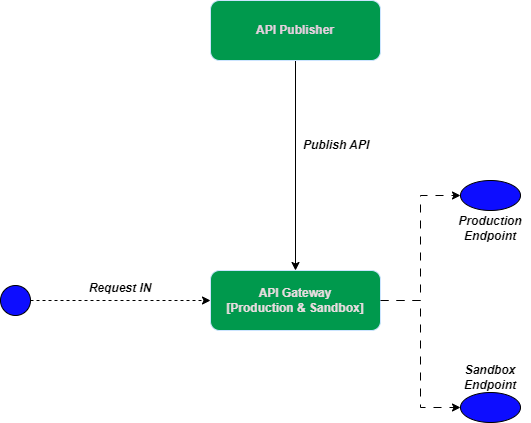
Pada asalnya sebuah instance gateway mampu melayani 2 buah jenis token , yaitu *Sandbox* dan *Production*. yang dikena dengan model *hybrid.* Ketika ada request yang masuk ke gateway, maka gateway memeriksa token yang digunakan. Apakah token tersebut merupakan token production ataukah sandbox. Lalu, request akan diteruskan ke endpoint yang sesuai dengan jenis tokennya. Berikut adalah scenario default untuk single gateway model hybrid :
[](https://satuinformasi.com/uploads/images/gallery/2023-03/kFvRyiP0k5CU3jLs-singe-gw-drawio.png)
**Single Gateway Hybrid**
**Distributed Deployment Gateway**
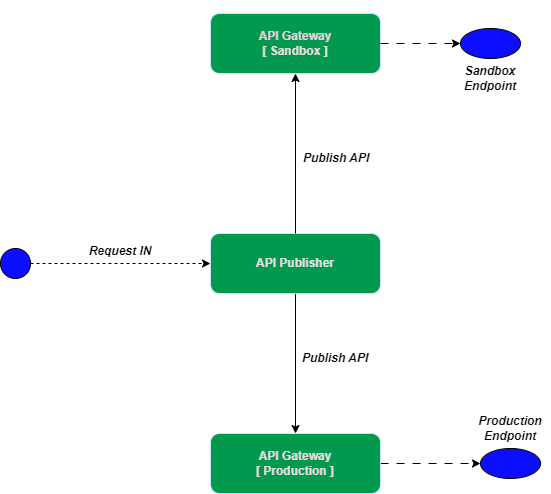
Single gateway memiliki kelebihan dari sisi kemudahan deployment, namun pada satu kondisi model arsitektur satu gateway yang mampu menangani lebih dari satu jenis token ini akan menurunkan performansi. Perlu dilakukan pembagian beban ke sejumlah gateway yang masing - masing berdiri sendiri atau yang dikenal dengan istilah *distributed gateway.* Satu gateway menangani jenis request yang berbeda - beda, misalnya satu gateway yang khusus untuk *Production* dan lainnya untuk *Sandbox.* Berikut ini ilustrasinya :
[](https://satuinformasi.com/uploads/images/gallery/2023-03/rKQzy6iKiroAhz2R-pattern-2gw-1cp-distributed-gw-drawio.png)
**Distributed Gateway**
**Case Study**
Sebuah perusahaan memiliki banyak API yang dikelompokkan menjadi 2 buah kelompok besar, yaitu:
- API Populer yang paling sering diakses
- API Standar yang jarang diakses
Setelah berjalannya waktu, gateway perusahaan sering mengalami keterlambatan respon bahkan bottleneck karena lalu lintasi data sangat tinggi terhadap API yang populer sehingga user yang mengakses API Standar yang jarang diakses menjadi terganggu.
Bagaimana solusi agar kedua jenis API ini tetap bisa diakses tanpa gangguan ?
**Solution**
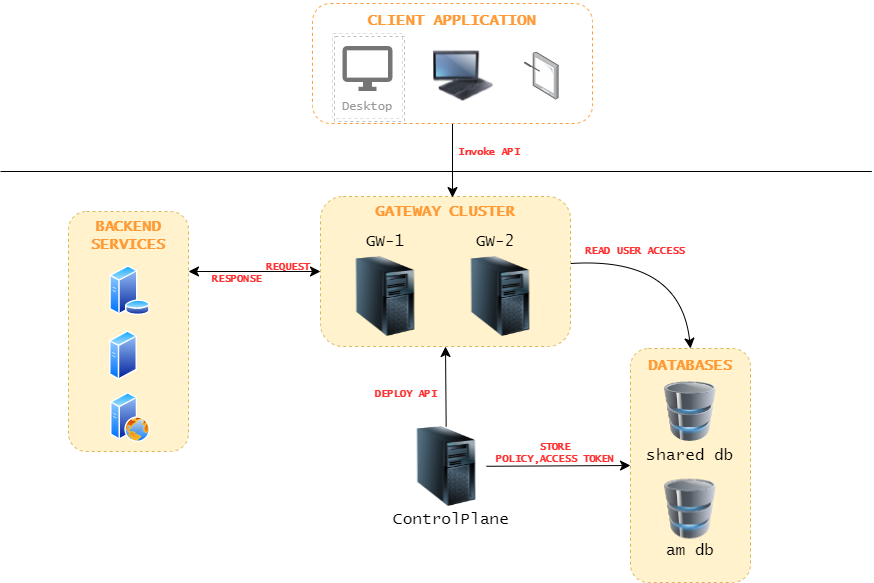
Perlu disiapkan instance sebagai berikut :
- dua buah gateway agar terhindari dari bottleneck,
- gateway **GW-1** untuk menangani API Populer
- gateway **GW-2** untuk menangani API Standar )
- satu buah control plane
Berikut ini adalah arsitektur jaringan yang akan kita bangun dan kita akan bangun dalam satu mesin (localhost) dengan port yang berbeda
[](https://satuinformasi.com/uploads/images/gallery/2023-03/aE7zV4ekxpVLBuVd-pattern-2gw-1cp-pattern-2gw1cp-drawio.png)
**1. Konfigurasi Instance Control Plane**
Control Plane adalah komponen APIM yang didalamnya terdiri atas :
- Traffic Manager
- Publisher
- Key Manager
- Development Portal/ Store
Berikut ini langkah - langkah konfiguras CP :
1. Siapkan fresh package WSO2 APIM
2. Jadikan package APIM ini sebagai profile *control plain* dengan menjalankan perintah berikut :
```bash
/bin/profileSetup.bat -Dprofile=control-plane
```
maka akan terlihat sejumlah artifact / war file akan dibuang sehingga lebih efisien ketika running
3. Buka file *deployment.toml* (*<PRODUCT\_HOME>/repository/conf*), lalu sesuaikan seperti pada table berikut. Informasi yang tidak ada pada table ini silahkan dihapus dari deployment.toml.
```
[server]
hostname = "localhost"
offset=0
base_path = "${carbon.protocol}://${carbon.host}:${carbon.management.port}"
server_role = "control-plane"
[super_admin]
username = "admin"
password = "admin"
create_admin_account = true
[user_store]
type = "database_unique_id"
[database.apim_db]
type = "postgre"
url = "jdbc:postgresql://localhost:5432/am_dbcp"
username = "wso2carbon"
password = "wso2carbon"
driver = "org.postgresql.Driver"
[database.shared_db]
type = "postgre"
url = "jdbc:postgresql://localhost:5432/shared_dbgw"
username = "wso2carbon"
password = "wso2carbon"
driver = "org.postgresql.Driver"
[keystore.tls]
file_name = "wso2carbon.jks"
type = "JKS"
password = "wso2carbon"
alias = "wso2carbon"
key_password = "wso2carbon"
[[apim.gateway.environment]] # ==> Konfigurasi Gateway 1
name = "GW-1"
type = "hybrid"
display_in_api_console = true
description = "This is a hybrid gateway 1 that handles both production and sandbox token traffic."
show_as_token_endpoint_url = true
service_url = "https://localhost:9444/services/"
username= "${admin.username}"
password= "${admin.password}"
http_endpoint = "http://localhost:8281"
https_endpoint = "https://localhost:8244"
[[apim.gateway.environment]] # ==> Konfigurasi Gateway 2
name = "GW-2"
type = "hybrid"
display_in_api_console = true
description = "This is a hybrid gateway 2 that handles both production and sandbox token traffic."
show_as_token_endpoint_url = true
service_url = "https://localhost:9445/services/"
username= "${admin.username}"
password= "${admin.password}"
http_endpoint = "http://localhost:8282"
https_endpoint = "https://localhost:8245"
[apim.cors]
allow_origins = "*"
allow_methods = ["GET","PUT","POST","DELETE","PATCH","OPTIONS"]
allow_headers = ["authorization","Access-Control-Allow-Origin","Content-Type","SOAPAction","apikey","Internal-Key"]
allow_credentials = false
[[event_handler]]
name="userPostSelfRegistration"
subscriptions=["POST_ADD_USER"]
[service_provider]
sp_name_regex = "^[\\sa-zA-Z0-9._-]*$"
[database.local]
url = "jdbc:h2:./repository/database/WSO2CARBON_DB;DB_CLOSE_ON_EXIT=FALSE"
[[event_listener]]
id = "token_revocation"
type = "org.wso2.carbon.identity.core.handler.AbstractIdentityHandler"
name = "org.wso2.is.notification.ApimOauthEventInterceptor"
order = 1
[event_listener.properties]
notification_endpoint = "https://localhost:${mgt.transport.https.port}/internal/data/v1/notify"
username = "${admin.username}"
password = "${admin.password}"
'header.X-WSO2-KEY-MANAGER' = "default"
```
4. Jalankan service dengan mengetik perintah :
```bash
/bin/api-manager.bat
```
5. Selesai konfigurasi instance WSO2 APIM sebagai control plane
---
**2. Konfigurasi Instance Gateway GW-1**
Berikut ini adalah langkah – langkah untuk mempersiapkan gateway GW-1 :
1. Siapkan fresh package WSO2 APIM
2. Jadikan package APIM ini sebagai *profile gateway* dengan menjalankan perintah berikut ,maka akan terlihat sejumlah artifact / war file akan dibuang sehingga lebih efisien ketika running ```
/bin/profileSetup.bat -Dprofile=gateway-worker
```
3. Buka file *deployment.toml* (*<PRODUCT\_HOME>/repository/conf*), lalu sesuaikan seperti pada table berikut. Informasi yang tidak ada pada table ini silahkan dihapus di *deployment.toml*. ```
[server]
server_role = "gateway-worker"
offset= 1
[super_admin]
username = "admin"
password = "admin"
create_admin_account = true
[user_store]
type = "database_unique_id"
[database.shared_db]
type = "postgre"
url = "jdbc:postgresql://localhost:5432/shared_dbgw"
username = "wso2carbon"
password = "wso2carbon"
driver = "org.postgresql.Driver"
[keystore.tls]
file_name = "wso2carbon.jks"
type = "JKS"
password = "wso2carbon"
alias = "wso2carbon"
key_password = "wso2carbon"
[truststore]
file_name = "client-truststore.jks"
type = "JKS"
password = "wso2carbon"
[apim.key_manager] # ==> Key Manager Configuration arahkan ke Control Plane
service_url = "https://localhost:9443/services/"
username= "$ref{super_admin.username}"
password= "$ref{super_admin.password}"
[apim.jwt]
enable = true
encoding = "base64" # base64,base64url
claim_dialect = "http://wso2.org/claims"
header = "X-JWT-Assertion"
signing_algorithm = "SHA256withRSA"
[apim.cors]
allow_origins = "*"
allow_methods = ["GET","PUT","POST","DELETE","PATCH","OPTIONS"]
allow_headers = ["authorization","Access-Control-Allow-Origin","Content-Type","SOAPAction","apikey","Internal-Key"]
allow_credentials = false
[apim.sync_runtime_artifacts.gateway] # ==> Nama Gateway
gateway_labels =["GW-1"]
[apim.throttling] # Traffic Manager configurations arahkan ke Control Plane
username= "$ref{super_admin.username}"
password= "$ref{super_admin.password}"
service_url = "https://localhost:9443/services/"
throttle_decision_endpoints = ["tcp://localhost:5672"]
enable_unlimited_tier = true
enable_header_based_throttling = false
enable_jwt_claim_based_throttling = false
enable_query_param_based_throttling = false
[[apim.throttling.url_group]] # Traffic Manager configurations arahkan ke Control Plane
traffic_manager_urls=["tcp://localhost:9611"]
traffic_manager_auth_urls=["ssl://localhost:9711"]
[apim.cache.gateway_token]
enable = true
expiry_time = 15
[apim.cache.resource]
enable = true
[apim.cache.jwt_claim]
enable = true
expiry_time = 900
[apim.oauth_config]
remove_outbound_auth_header = true
auth_header = "Authorization"
[apim.cors]
allow_origins = "*"
allow_methods = ["GET","PUT","POST","DELETE","PATCH","OPTIONS"]
allow_headers = ["authorization","Access-Control-Allow-Origin","Content-Type","SOAPAction","apikey","Internal-Key"]
allow_credentials = false
```
4. Jalankan service dengan mengetik perintah : ```
/bin/api-manager.bat
```
5. Selesai konfigurasi instance gateway GW-1
---
**3. Konfigurasi Instance Gateway GW-2**
Berikut ini adalah langkah – langkah untuk mempersiapkan gateway GW-2:
1. Siapkan fresh package WSO2 APIM
2. Jadikan package APIM ini sebagai *profile gateway* dengan menjalankan perintah berikut , maka akan terlihat sejumlah artifact / war file akan dibuang sehingga lebih efisien ketika running ```
/bin/profileSetup.bat -Dprofile=gateway-worker
```
3. Buka file *deployment.toml* (*<PRODUCT\_HOME>/repository/conf*), lalu sesuaikan seperti pada table berikut. Informasi yang tidak ada pada table ini silahkan dihapus di *deployment.toml.* ```
[server]
server_role = "gateway-worker"
offset= 2
[super_admin]
username = "admin"
password = "admin"
create_admin_account = true
[user_store]
type = "database_unique_id"
[database.shared_db]
type = "postgre"
url = "jdbc:postgresql://localhost:5432/shared_dbgw"
username = "wso2carbon"
password = "wso2carbon"
driver = "org.postgresql.Driver"
[keystore.tls]
file_name = "wso2carbon.jks"
type = "JKS"
password = "wso2carbon"
alias = "wso2carbon"
key_password = "wso2carbon"
[truststore]
file_name = "client-truststore.jks"
type = "JKS"
password = "wso2carbon"
[apim.key_manager] #==> arahkan ke Control Plane
service_url = "https://localhost:9443/services/"
username= "$ref{super_admin.username}"
password= "$ref{super_admin.password}"
[apim.jwt]
enable = true
encoding = "base64" # base64,base64url
claim_dialect = "http://wso2.org/claims"
header = "X-JWT-Assertion"
signing_algorithm = "SHA256withRSA"
[apim.cors]
allow_origins = "*"
allow_methods = ["GET","PUT","POST","DELETE","PATCH","OPTIONS"]
allow_headers = ["authorization","Access-Control-Allow-Origin","Content-Type","SOAPAction","apikey","Internal-Key"]
allow_credentials = false
[apim.sync_runtime_artifacts.gateway] #==> Ini adalah nama Gateway Alias
gateway_labels =["GW-2"]
[apim.throttling] # ==> Traffic Manager configurations arahkan ke Control Plane
username= "$ref{super_admin.username}"
password= "$ref{super_admin.password}"
service_url = "https://localhost:9443/services/"
throttle_decision_endpoints = ["tcp://localhost:5672"]
enable_unlimited_tier = true
enable_header_based_throttling = false
enable_jwt_claim_based_throttling = false
enable_query_param_based_throttling = false
[[apim.throttling.url_group]] # ==> Traffic Manager configurations arahkan ke Control Plane
traffic_manager_urls=["tcp://localhost:9611"]
traffic_manager_auth_urls=["ssl://localhost:9711"]
[apim.cache.gateway_token]
enable = true
expiry_time = 15
[apim.cache.resource]
enable = true
[apim.cache.jwt_claim]
enable = true
expiry_time = 900
[apim.oauth_config]
remove_outbound_auth_header = true
auth_header = "Authorization"
[apim.cors]
allow_origins = "*"
allow_methods = ["GET","PUT","POST","DELETE","PATCH","OPTIONS"]
allow_headers = ["authorization","Access-Control-Allow-Origin","Content-Type","SOAPAction","apikey","Internal-Key"]
allow_credentials = false
```
4. Jalankan service dengan mengetik perintah : ```
/bin/api-manager.bat
```
5. Selesai konfigurasi instance gateway GW-2
---
**4. Publish API**
1. Buat sample Pizza Shack dan deploy ke gateway **GW-1**
- Masuk ke portal developer [https://localhost:9443/devportal](https://localhost:9443/devportal)
- Klik *Rest API - Deploy Sample API[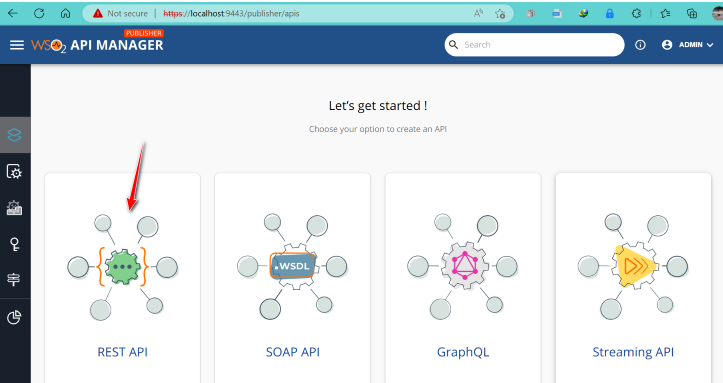](https://satuinformasi.com/uploads/images/gallery/2023-03/i4ZT116fCoECOC48-rest-api.png)[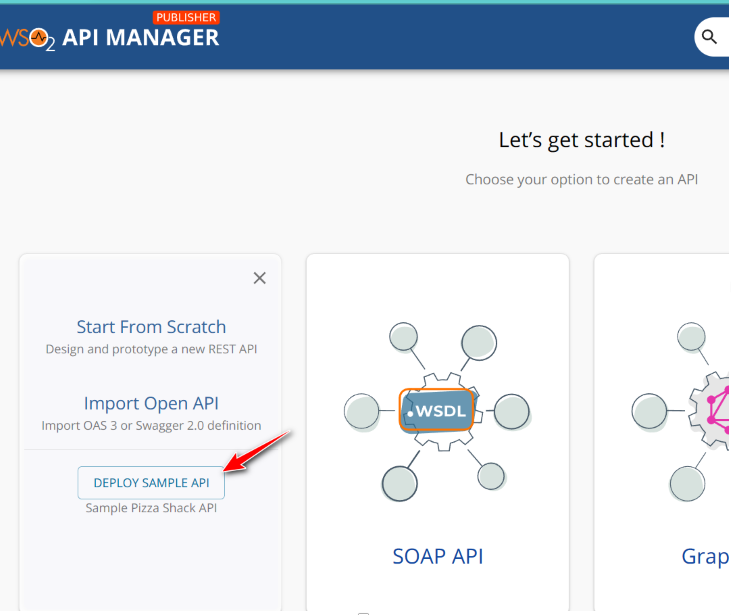](https://satuinformasi.com/uploads/images/gallery/2023-03/dzeDJ5MUhrLHGg45-deploy-sample.png)*
- Secara otomatis, API akan ter-deploy ke gateway GW-1 [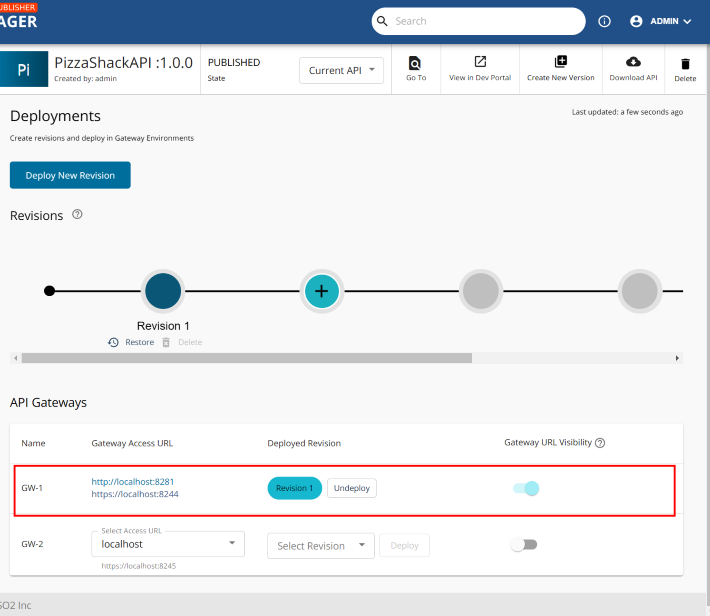](https://satuinformasi.com/uploads/images/gallery/2023-03/a2Vu7yqNyYpIogJt-deploy2gw1.png)
- Selesai buat sample API di GW-1
2. Buat sample API JSON Placeholder dan deploy ke gateway **GW-2** :
- Klik menu *Create API - Start From Scratch*
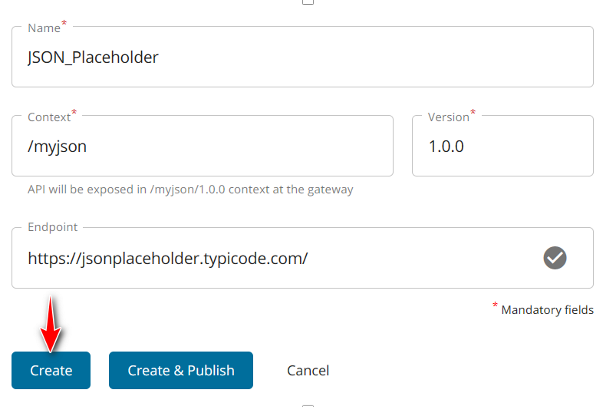
- Masukkan informasi API berikut dan klik tombol **Create**| **PROPERTY** | **VALUE** |
| Name | JSON\_Placeholder |
| Context | /myjson |
| Version | 1.0.0 |
| Endpoint | [https://jsonplaceholder.typicode.com/](https://jsonplaceholder.typicode.com/) |
[](https://satuinformasi.com/uploads/images/gallery/2023-03/WM1Ga1I9FFir75Yp-create-api.png)
- Tambahkan *resource* melalui menu *Develop - API Configurations - Resources*, lalu klik tombol *"+"* dan klik tombol **Save**| **PROPERTY** | **VALUE** |
| HTTP VERB | GET
|
| URL Pattern | /POSTS |
- Kini saatnya deploy API ke Gateway GW-2 melalui *Deploy - Deployments* dan pilih *GW-2* serta klik tombol *Deploy [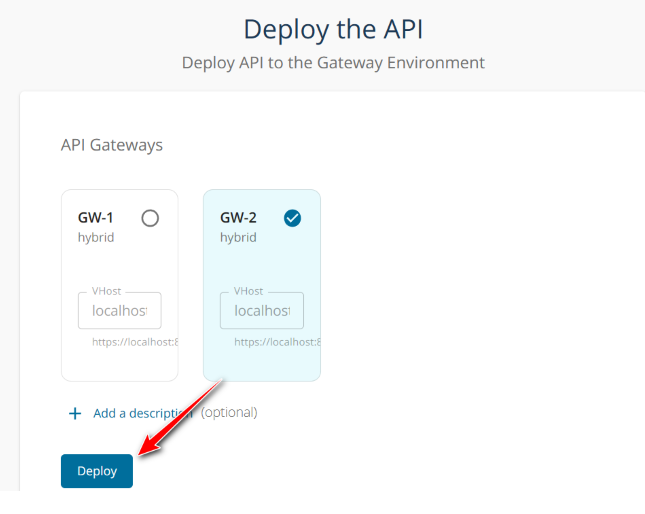](https://satuinformasi.com/uploads/images/gallery/2023-03/V8ApwvBoDAsWHvq2-deploy-gw2.png)[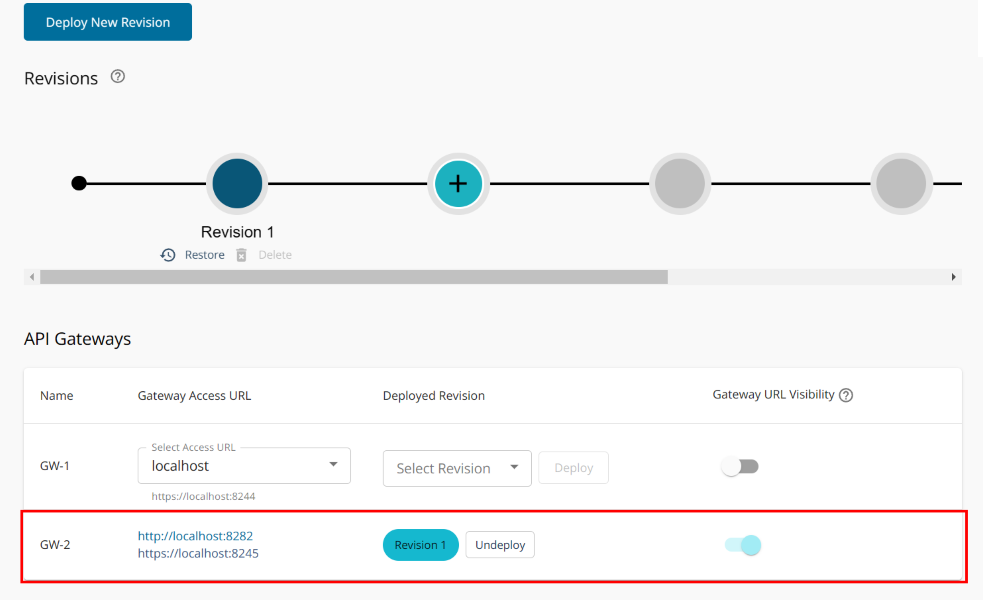](https://satuinformasi.com/uploads/images/gallery/2023-03/XFqdsekHhvILS5Mh-deploy-gw2-2.png)*
- Selesai buat sample di GW-2
Silahan tryout